TCP Working: 3-Way Handshake & Reliable Communication
I write technical Blogs
.jpg)
TCP
TCP stands for Transmission Control Protocol.
It is a connection-oriented protocol that allows devices to communicate reliably over a network.
Key Features of TCP
Ensures data reaches the destination correctly
Maintains correct order of data
Detects and retransmits lost packets
Works well even when the network is slow or unreliable
Used : Web browsing, emails, file transfers.
TCP 4-Layer Model
The TCP/IP model is a 4-layer networking model used in real-world internet communication.
1. Application Layer
Purpose:
Allows users to interact with network-connected applications.
Functions:
Data formatting
Application-level communication
Protocols:
HTTP / HTTPS – Web
SMTP – Email
FTP – File transfer
2. Transport Layer
Purpose:
Manages end-to-end communication between devices.
Functions:
Data segmentation
Port addressing
Flow control and reliability
Protocols:
TCP – Reliable, ordered delivery
UDP – Fast, best-effort delivery
3. Internet Layer
Purpose:
Responsible for logical addressing and routing across networks.
Functions:
Assigns IP addresses
Routes packets between networks
Protocols:
IP (IPv4 / IPv6)
ICMP
4. Network Access Layer
Purpose:
Handles physical data transmission over the network.
Functions:
Frame creation
MAC addressing
Signal transmission
Technologies:
Ethernet
Wi-Fi
ARP
Problems in IP Networks & How TCP Solves Them
Packet Loss → Reliable Delivery
Problem:
Some data packets may disappear on the way.
TCP Solution:
Receiver sends an ACK (acknowledgement) for received data
If sender doesn’t get an ACK → it resends the data
Result: No data is lost.
Out-of-Order Packets → Sequencing
Problem:
Packets can take different paths and arrive in the wrong order.
TCP Solution:
Each packet gets a sequence number
Receiver rearranges packets correctly
Result: Data is delivered in the right order.
Data Corruption → Error Checking
Problem:
Data can get damaged during transmission.
TCP Solution:
Uses a checksum to detect corruption
Corrupted data is discarded
Sender is asked to resend
Result: Only correct data is accepted.
Network Congestion → Congestion Control
Problem:
Sending too much data too fast can overload the network.
TCP Solution:
Starts sending data slowly (slow start)
Increases speed if network is fine
Slows down if packet loss is detected
Result: Network doesn’t get overwhelmed.
Receiver Overload → Flow Control
Problem:
A fast sender can overwhelm a slow receiver.
TCP Solution:
Receiver tells sender how much data it can handle
Uses a sliding window mechanism
Result: Sender sends only what receiver can process.
Connection Management → Connection-Oriented
Problem:
Data shouldn’t be sent unless both sides are ready.
TCP Solution:
Uses 3-way handshake to start communication
- SYN → SYN-ACK → ACK
Uses a 4-step process to close connection safely
Result: Both sides stay synchronized.
Duplicate Data → Detection
Problem:
Same packet may arrive more than once.
TCP Solution:
Uses sequence numbers to identify duplicates
Discards extra packets
Result: No repeated data.
Why TCP Is Primary Use
Because TCP guarantees accuracy and completeness, it is used where data must not break:
Web browsing (HTTP / HTTPS)
Email (SMTP, IMAP, POP3)
File transfers (FTP, SFTP)
Remote login (SSH)
TCP 3-Way Handshake
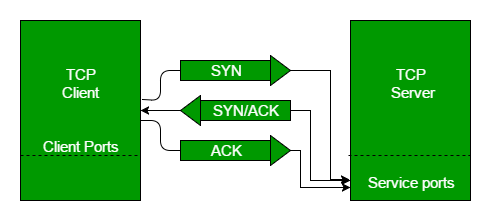
The 3-way handshake is the process used by TCP to establish a connection before data transfer begins.
Step 1: SYN (Synchronize)
The client wants to establish a connection with the server
The client sends a TCP segment with the SYN flag set
This segment includes the initial sequence number chosen by the client
Meaning:
“I want to communicate, and this is the sequence number I will start with.”
Step 2: SYN + ACK (Synchronize Acknowledge)
The server receives the SYN segment
The server responds with a segment that has both SYN and ACK flags set
ACK acknowledges the client’s SYN
SYN contains the server’s own initial sequence number
Meaning:
“I received your request, I’m ready too, and this is my starting sequence number.”
Step 3: ACK (Acknowledge)
The client sends an ACK segment back to the server
This acknowledges the server’s sequence number
Meaning:
“I received your response. Connection is established.”
After the Handshake
A reliable TCP connection is now established
Both sides know each other’s sequence numbers
Actual data transfer can begin
Steps of TCP Data Transfer
Step 1: Segment Generation
Data moves from the application layer to TCP
TCP adds a header (ports, sequence numbers)
Data is split into segments
Step 2: IP Encapsulation
TCP segments are passed to the IP layer
IP wraps them into packets
Packets are routed across the network
Step 3: Reception and Acknowledgment
Receiver collects incoming segments
Reorders them using sequence numbers
Sends ACKs to confirm successful delivery
Step 4: Connection Termination
When communication is complete:
One side sends a FIN signal
The other side acknowledges it
Both sides close the connection gracefully
How TCP Ensures Reliability, Correctness, and Order
TCP achieves this through connection management, sequence numbers, acknowledgments, error checking, and control mechanisms.
1. Reliability (Ensuring Data Is Delivered)
TCP guarantees that no data is lost during transmission.
How it works:
TCP uses positive acknowledgment with retransmission (PAR).
Every piece of data sent must be acknowledged (ACKed) by the receiver.
If an acknowledgment is not received, TCP assumes the data was lost and resends it.
Key mechanisms:
Sequence numbers
Each byte of data is numbered. This helps TCP track what has been sent and what has been received.Acknowledgments (ACKs)
The receiver sends back an ACK indicating the next byte it expects.Timeout and retransmission
If the sender does not receive an ACK within a certain time, it retransmits the data.Fast retransmit
If the sender receives multiple duplicate ACKs, it quickly resends the missing data without waiting for a timeout.Three-way handshake
TCP first establishes a connection (SYN, SYN-ACK, ACK) to ensure both sides are ready before sending data.
Result:
All data sent by the sender eventually reaches the receiver.
2. Correctness (Ensuring Data Is Not Corrupted)
TCP ensures that data is received exactly as it was sent, without errors.
How it works:
Each TCP segment includes a checksum.
The sender calculates the checksum before sending the data.
The receiver recalculates the checksum after receiving it.
What happens if data is corrupted:
If the checksum does not match, the packet is considered corrupted.
The receiver discards the packet and does not send an ACK.
The sender notices the missing ACK and retransmits the data.
Result:
Only correct, error-free data is delivered to the application.
3. Order (Ensuring Data Is Delivered in the Correct Sequence)
Packets on the internet may arrive out of order because they can take different routes.
How TCP fixes this:
Each segment carries a sequence number.
The receiver uses these numbers to reassemble data in the correct order.
Out-of-order packets are temporarily stored in a buffer until missing packets arrive.
Result:
The application always receives data in the exact order it was sent.
4. Flow Control and Congestion Control (Preventing Overload)
TCP also prevents systems and networks from being overwhelmed.
Flow Control (Receiver Protection)
The receiver tells the sender how much data it can handle using a window size.
The sender limits how much data it sends based on this value.
This prevents a fast sender from overwhelming a slow receiver.
Congestion Control
TCP monitors network conditions.
If packet loss occurs, TCP assumes congestion.
It reduces the sending rate using mechanisms like Slow Start and Congestion Avoidance.
This keeps the network stable and avoids congestion collapse.
How a TCP Connection Is Closed
A TCP connection is closed using a 4-way handshake, which allows both sides to finish sending data and agree to terminate the connection safely. Because TCP is full-duplex, each direction of communication is closed independently.
1. FIN — Close Request
One side (client or server) sends a FIN (Finish) segment.
Meaning: “I have no more data to send.”
This closes only the sender’s outgoing data stream.
2. ACK — Acknowledgment
The other side replies with an ACK.
Meaning: “I received your FIN.”
The connection is now half-closed.
The receiver can still send remaining data.
3. FIN — Close Response
When the second side finishes sending its data, it sends its own FIN.
- Meaning: “I am also done sending data.”
4. ACK — Final Acknowledgment
The original sender responds with a final ACK.
The logical connection is now closed.
The sender enters the TIME-WAIT state.
Important Concepts
Half-Close
Each FIN closes one direction of the connection.
Data can still flow in the opposite direction until its FIN is sent.
TIME-WAIT State
After sending the final ACK, TCP waits for a short period:
Ensures the last ACK is received
Handles delayed or duplicate packets
Prevents old packets from interfering with new connections
Abrupt Close (RST)
If a connection must be terminated immediately, a RST (Reset) is sent.
No handshake, no graceful shutdown.
Used for errors or unexpected conditions.